 Neel Thakkar
As businesses scale, their Salesforce orgs grow with them, more customers, more activities, more processes, and more data. But when data grows faster than the architecture supporting it, Salesforce performance begins to slow down.
Large Data Volume (LDV) is no longer a rare scenario. Industries like manufacturing, healthcare, real estate, finance, and e-commerce now routinely deal with millions of records. And for Salesforce developers, admins, architects, and business leaders, LDV has become a critical factor in system performance, automation speed, and overall user productivity.
In this blog, we break down how LDV affects your org, why it happens, and what your company can do to protect performance at scale.
What Qualifies as Large Data Volume in Salesforce?
- Large Data Volume (LDV) in Salesforce doesn’t have a single universal number. Instead, it depends on how data is structured, accessed, and automated.
- However, Salesforce generally starts treating an object as high volume when it approaches hundreds of thousands of records, especially when those records are actively queried or updated.
LDV becomes challenging based on several factors, including:
- How frequently the data is read or written
- How many relationships the object has
- The complexity of triggers, flows, and validation rules
- The volume and frequency of integrations
- Data skew or unequal record ownership
- Whether filters are selective or unselective
- This means LDV isn’t always about having “millions of records.” Even 200k–300k heavily accessed records can degrade performance if the data model or automation isn’t optimized.
Typical LDV Scenarios Include:
- Case objects with years of service history
- Sales pipelines with large volumes of activities and tasks
- E-commerce order records, transactions, and logs
- Machine-generated or IoT data ingested at high frequency
- Community portals that generate heavy read/write activity
LDV becomes a real concern not when the data grows, but when the system can no longer process it efficiently and consistently.
How LDV Impacts Salesforce Performance?
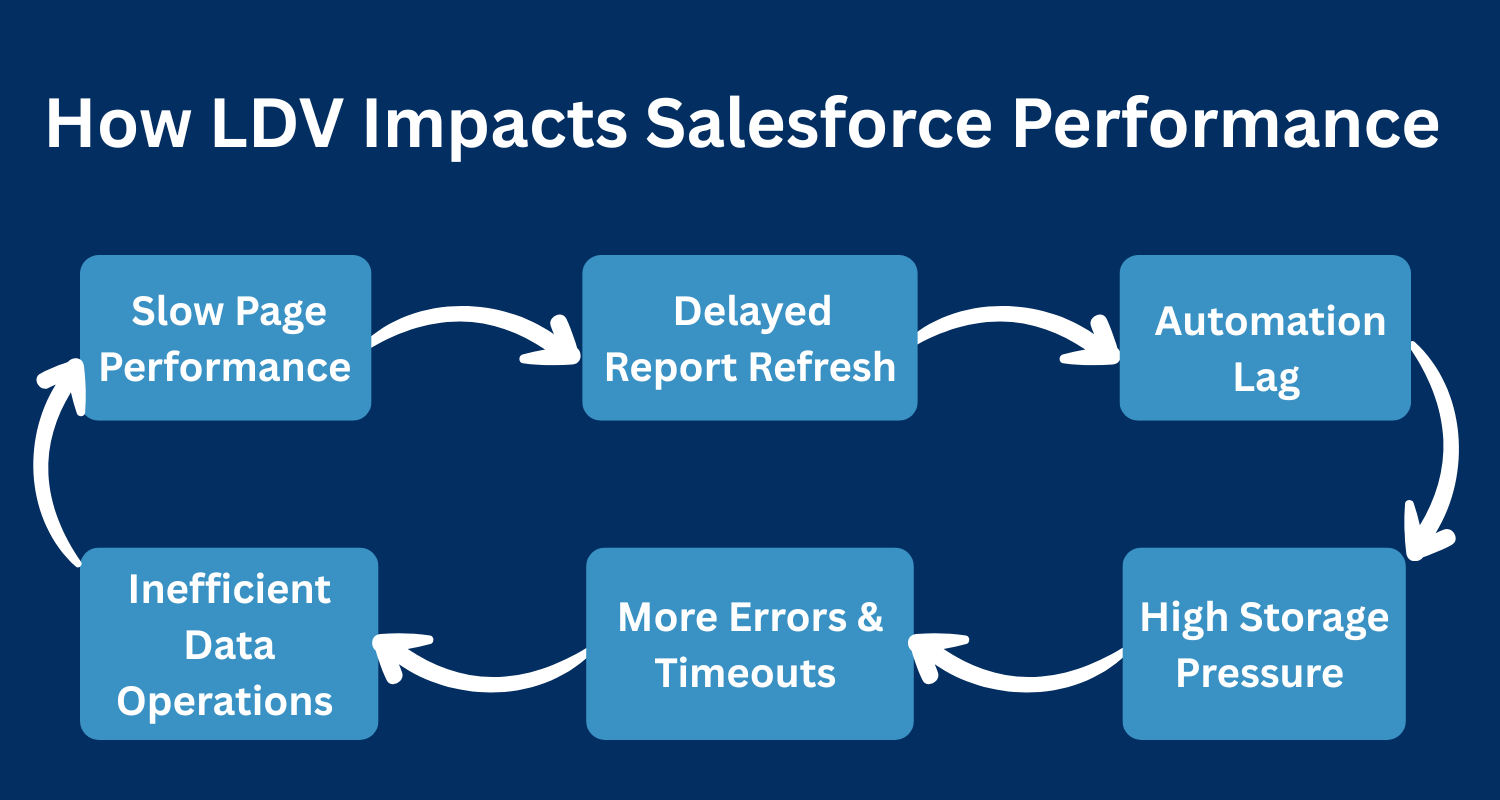
- As data volume increases, Salesforce performance begins to slow across multiple layers of the platform. The impact often starts subtly with slightly slower list views and delayed automation and gradually becomes a major productivity challenge as record counts continue to grow.
- Large Data Volume affects performance because every operation such as querying, filtering, updating, reporting, or automating requires Salesforce to process more information than before. When the data model, indexes, and automation are not optimized for scale, the system reaches its limits much faster.
Below are the key performance areas affected by LDV:
1. Slower Page Loads and UI Delays
Record pages, related lists, and list views load more slowly when:
- Queries are scanning too many rows
- Related lists contain thousands of child records
- Filters are no longer selective
- Page layouts become field-heavy
This results in noticeable delays for end users working across Sales, Service, or Community interfaces.
2. Reports and Dashboards Take Longer to Refresh
Analytics performance is heavily impacted when datasets grow large.
Dashboards and reports slow down because:
- They process large datasets before applying filters
- Time-based or multi-filter reports become expensive to run
- Fields used for filtering are not indexed
This creates delays in leadership insights and real-time decision-making.
3. Automation Execution Slows Down
Flows, triggers, and workflows start executing more slowly as LDV increases.
Common symptoms include:
- Flows taking longer due to large Get Records operations
- Increased CPU usage leading to Flow or Apex errors
- Overlapping automations running concurrently on large datasets
Automation that once worked smoothly at 100k records may struggle significantly at 1M+.
4. Read/Write Operations Become Less Efficient
Create, update, and delete operations begin to slow when Salesforce must process:
- Many parent-child relationships
- Complex validation rules
- Multiple flows or triggers firing at once
This can lead to delays when updating opportunities, cases, orders, or any high-volume object.
5. Higher Risk of Errors and Timeouts
As volume increases, the system becomes more prone to:
- Row-locking conflicts
- Apex CPU timeouts
- Unhandled Flow failures
- Integration timeouts or retries
- Batch Apex failures mid-execution
These failures directly disrupt business processes and user productivity.
6. Increased Storage and Infrastructure Load
More data means:
- Higher storage consumption
- More expensive cleanup efforts
- Fragmented records and attachments
- Slower indexing and larger table scans
Over time, this impacts not just performance but cost and maintainability as well.
How LDV Affects Automations in Salesforce?

- Large Data Volumes cause automation to run slower, take longer to execute, and fail more often because every Flow, Trigger, and Apex job must process significantly more records than before.
- Flows become sluggish when they loop through big datasets or use unselective queries, leading to timeouts, long execution paths, and unexpected failures during peak load.
- Triggers experience delays and frequent record-lock conflicts as multiple automations and users try to update the same parent or related records simultaneously.
- Batch Apex jobs start running for hours instead of minutes, hit governor limits faster, and often fail midway, creating backlogs that slow down other automation processes.
- Integrations begin to time out when exposed to large datasets, causing retries, API load spikes, and failures in external systems that cannot handle Salesforce’s increased volume.
- Governor limits get consumed rapidly CPU time, SOQL counts, and DML operations making automation more fragile and more prone to breaking as data continues to grow.
Best Practices to Improve Performance in LDV Environments
1. Optimize SOQL Queries
- Always use selective filters with indexed fields to avoid full table scans and improve query efficiency.
- Query only the necessary fields and apply tight WHERE conditions to minimize the number of records processed.
- Ensure filters match data distribution and avoid wildcards or unselective queries that slow down performance.
- Optimized queries reduce governor limit consumption and improve automation and integration reliability.
2. Apply Indexing Strategy
- Standard indexes help common fields, but custom indexes should be added for frequently queried or reporting fields.
- Proper indexing improves query selectivity, reduces timeout scenarios, and enhances overall platform responsiveness.
- Fields used in filters, lookups, or heavy reporting benefit the most from an indexing strategy.
- Align indexes with actual business processes to maintain consistent performance under LDV conditions.
3. Archive & Purge Historical Data
- Move inactive or old records to external storage or Big Objects to reduce pressure on transactional objects.
- Regularly clean up data to prevent long-term system bloats and maintain fast query and report performance.
- Archiving ensures users interact only with relevant, active records, improving efficiency across teams.
- Purging unnecessary records minimizes record locking, prevents timeouts, and keeps automations running smoothly.
4. Bulkify All Automation
- Design triggers, flows, and Apex to process multiple records at once, avoiding per-record repetitive operations.
- Use collections like lists and sets in Apex and Fast Lookup patterns in Flows to handle large datasets efficiently.
- Bulkification helps stay within governor limits and prevents automation from slowing down under LDV.
- Ensures reliable execution of large batch operations without system errors or delays.
5. Use Skinny Tables
- Skinny tables store a subset of frequently accessed fields from large objects, improving query speed.
- Particularly useful for read-heavy operations like dashboards, list views, and reporting.
- Maintained automatically by Salesforce, providing performance benefits without changing existing application logic.
- Ideal for high-volume objects where query performance is critical, though not a universal solution.
6. Adopt Asynchronous Processing
- Use Batch Apex, Queueables, Platform Events, or Future methods to offload heavy operations from real-time transactions.
- Processes large datasets in the background, maintaining system responsiveness for end users.
- Helps avoid hitting CPU, DML, and SOQL limits during high-volume operations.
- Distributing work into smaller chunks improves system efficiency and reliability.
7. Reduce Automation Complexity
- Simplify flows, triggers, and other automation to prevent performance bottlenecks in high-volume environments.
- Consolidate redundant automation and break down complex logic into modular, manageable components.
- Reducing dependencies prevents recursion and conflicts between automation layers.
- Streamlined automation ensures long-term scalability, reliability, and maintainable system performance.
What Are the Best Strategies to Scale Salesforce for High Data Volumes?
- Use Big Objects to store massive, append-only datasets like logs, historical transactions, or audit trails without slowing down standard objects. They help maintain high performance for day-to-day operations while still preserving long-term data for compliance, analytics, or reporting. Big Objects ensure scalability even when data grows into millions or billions of records.
- Leverage External Objects to keep large datasets outside Salesforce while giving users real-time access through Salesforce Connect. This reduces storage costs and prevents internal tables from becoming too heavy. External Objects support reporting, lookups, and automation, enabling teams to work with large datasets efficiently without affecting org speed.
- Apply Data Partitioning by splitting large datasets into meaningful segments such as region, business unit, or time period. Partitioning helps Salesforce run queries faster, avoids full-table scans, and reduces strain on automation. It also minimizes row locks, improves concurrency, and makes reporting more accurate for high-volume operations.
- Choose the Right Integration Pattern based on volume and frequency—whether using CDC for real-time updates, Streaming APIs for event-driven communication, ETL tools for bulk sync, or Platform Events for asynchronous processing. Selecting the correct pattern ensures data moves smoothly between systems without adding load to Salesforce or slowing user workflows.
- Run Load & Performance Testing early in the project lifecycle to simulate actual data volume, concurrent users, and integration throughput. Testing helps identify performance issues in flows, triggers, queries, and dashboards before they reach production. This proactive approach ensures stability, avoids timeouts, and prepares the org for future growth.
- Define Clear Retention Policies to manage how long data is stored, what gets archived, and what should be deleted. Proper data lifecycle planning prevents objects from becoming bloated and helps keep automation fast. Retention policies also support compliance needs while ensuring reports, dashboards, and processes continue operating efficiently as data grows.
Business Impact of Not Managing LDV

- Failing to manage Large Data Volume (LDV) can affect every layer of a business, from day-to-day operations to strategic decision-making.
- Sales teams may experience slower opportunity updates, delayed pipeline visibility, and reduced productivity because key data takes longer to load.
- Service teams can face sluggish case updates, automation failures, and longer handling times, leading to lower customer satisfaction. Dashboards and reports become less reliable, making it difficult for leadership to make timely and informed decisions.
- Beyond productivity, ignoring LDV increases operational costs and system maintenance efforts. Integration failures, timeouts, and recurring errors create additional overhead, while storage costs rise as unneeded data accumulates.
- Automation becomes fragile, slowing workflows and creating bottlenecks that compound over time. Overall, unmanaged LDV impacts revenue, efficiency, and customer experience, making proactive planning essential for long-term Salesforce success.
Essential Salesforce Tools to Manage Large Data Volumes
1. Salesforce Data Cloud
- Handles massive datasets without affecting your core Salesforce objects, ensuring the org stays fast and responsive.
- Provides real-time segmentation, unified customer data, and AI-driven insights for smarter decision-making.
- Ideal for workloads that exceed standard relational database limits, keeping high-volume data manageable.
2. Big Objects
- Stores billions of records efficiently for logs, historical events, and audit data while keeping operational objects lightweight.
- Supports Async SOQL queries, enabling reporting and analysis without slowing down the system.
- Reduces load on the main org by offloading large datasets that don’t require frequent updates.
3. Salesforce Connect
- Lets you access external databases like ERP or SQL systems in real-time without importing the data.
- Keeps your Salesforce org lightweight while allowing reports, lookups, and automation on external data.
- Ideal for high-volume datasets that are not needed internally but must be visible to users.
4. Bulk API & Bulk API 2.0
- Optimized for importing, updating, or deleting large datasets asynchronously, preventing timeouts.
- Supports parallel processing to speed up large-scale integrations or data migrations.
- Reduces strain on the org by handling high-volume operations outside synchronous workflows.
5. Platform Events & Change Data Capture
- Enables event-driven processing, moving heavy automation and integrations off synchronous workflows.
- Allows real-time updates across systems without slowing down Flows, Triggers, or Batch Apex jobs.
- Ideal for organizations with high-volume transactions and integration needs.
6. Salesforce Optimizer
- Scans your org to identify heavy fields, slow automation, and unused components that affect performance.
- Provides actionable recommendations to optimize queries, automation, and object design.
- Helps maintain a scalable and high-performing Salesforce org even as data grows
How Expro Softech Helps Companies Manage LDV Efficiently
At Expro Softech, we specialize in designing Salesforce systems built for scale.
We help clients:
- Assess LDV risks and performance bottlenecks
- Optimize automation, triggers, and flows
- Redesign system architecture for scalability
- Implement LDV-friendly data models
- Execute data archival and cleanup frameworks
- Set up scalable integration strategies
- Improve query and index performance
- Conduct load testing before large deployments
Our consulting approach combines technical excellence + business understanding, ensuring your Salesforce org remains fast, reliable, and ready to grow.
Conclusion
Large Data Volume is inevitable—but performance issues don’t have to be.
By understanding LDV early, optimizing automation, designing efficient architectures, and preparing your org for scale, you can ensure long-term speed and reliability across all business functions.
A well-architected Salesforce system is not just a technical advantage—it becomes a core driver of growth, automation, and customer experience.