 Neel Thakkar
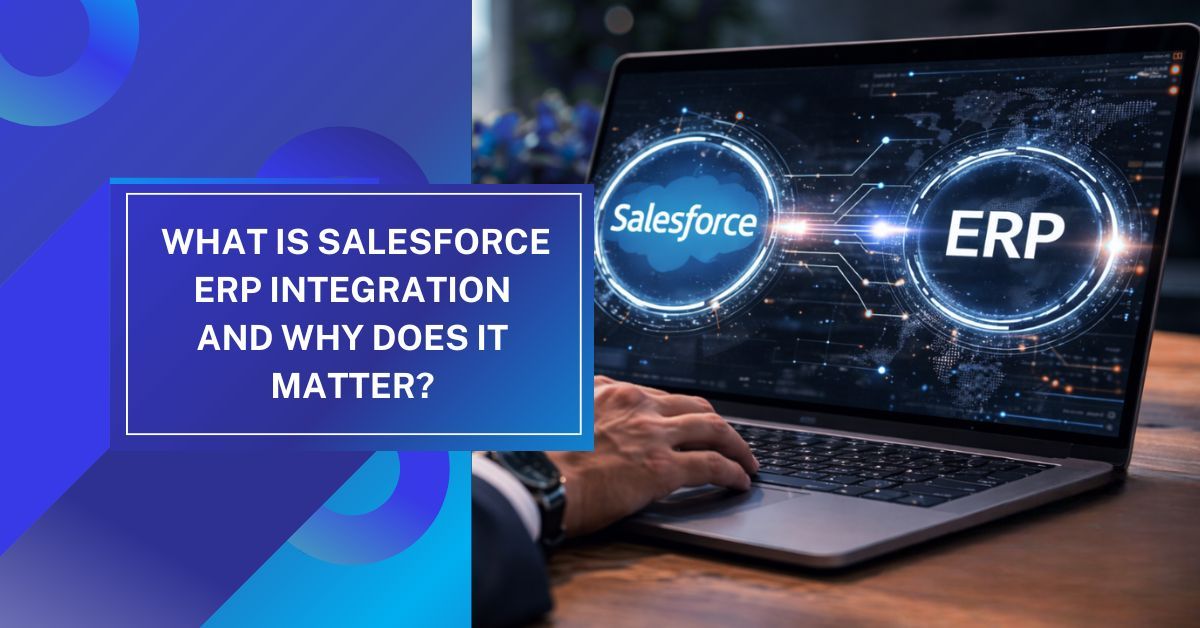
Modern organizations use multiple digital systems to manage different aspects of their operations. Salesforce CRM helps businesses manage customer relationships, sales activities, marketing campaigns, and service operations, while ERP systems handle core operational processes such as finance, inventory management, supply chain operations, procurement, and order fulfillment. Both platforms play an important role in helping companies operate efficiently and make informed business decisions.
However, when Salesforce and ERP systems operate separately, businesses often face challenges such as data silos, manual data entry, and inconsistent reporting. Integrating Salesforce with ERP systems connects customer-facing processes with operational workflows, enabling seamless data synchronization across departments. This guide explains the importance of Salesforce ERP integration, key integration approaches, and best practices for successful implementation.
What is ERP?
- Enterprise Resource Planning, commonly known as ERP, refers to software systems that help organizations manage and automate core business operations through a centralized platform.
- ERP systems integrate various business processes such as finance, inventory, procurement, manufacturing, supply chain management, and human resources into a single system that provides real-time insights across departments.
- The primary goal of ERP software is to improve operational efficiency by eliminating fragmented systems and enabling teams to work with consistent and accurate data.
- Instead of managing multiple disconnected applications, ERP platforms allow businesses to consolidate their operational processes into a unified system that supports collaboration, transparency, and data-driven decision-making.
- Modern ERP systems play a vital role in helping organizations monitor financial performance, track inventory levels, manage supply chains, and optimize resource planning.
- Many large enterprises and growing businesses rely on ERP solutions such as SAP, Oracle ERP, Microsoft Dynamics, NetSuite, and Sage to manage their operations. When ERP systems are combined with Salesforce CRM, organizations can bridge the gap between customer engagement and operational management.
Understanding the Difference Between Salesforce and ERP
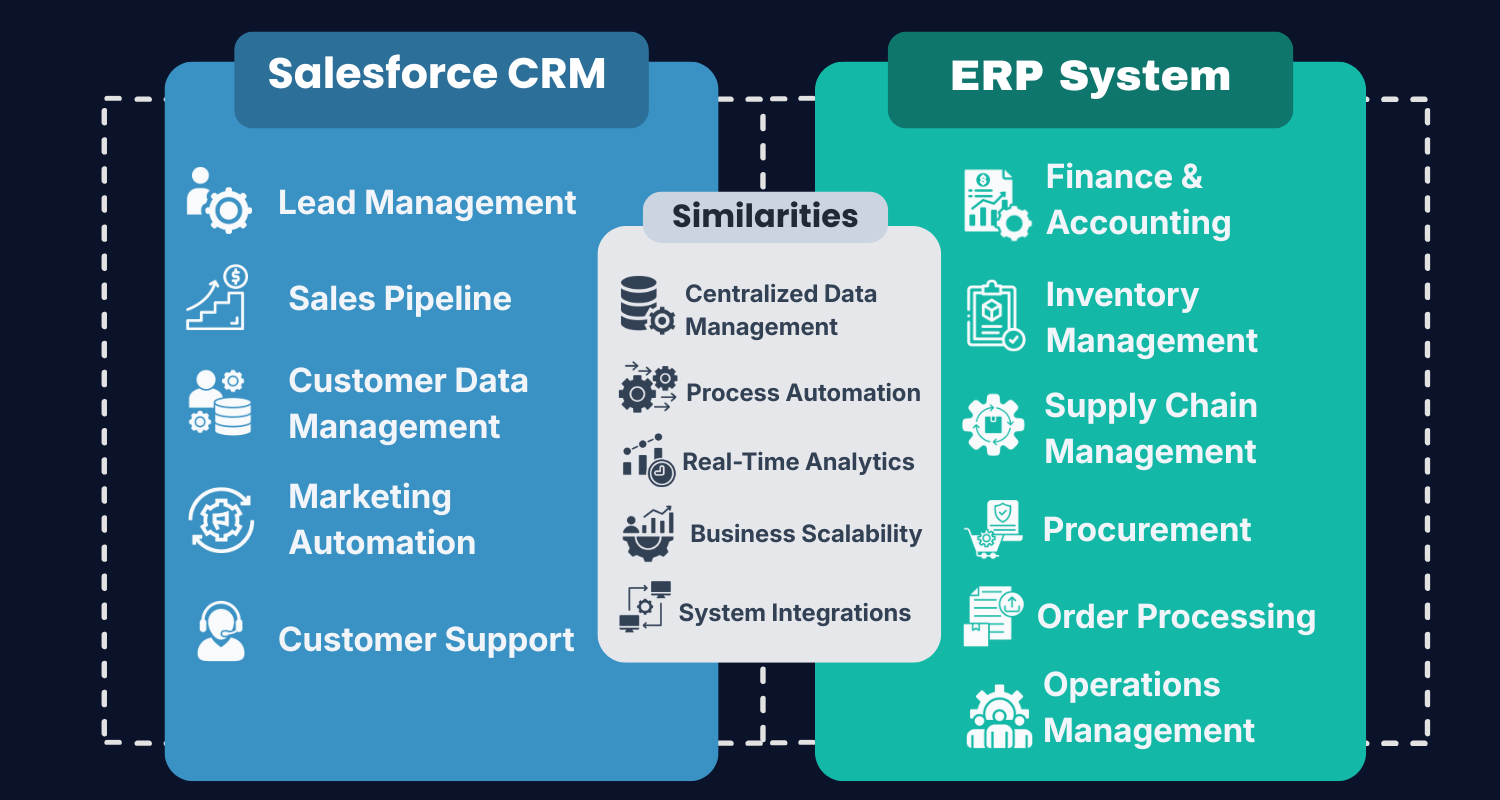
- Salesforce and ERP systems serve different but complementary purposes within an organization. Salesforce is designed to help businesses manage customer relationships, sales pipelines, marketing automation, and customer service interactions.
- It focuses on improving customer engagement, increasing sales productivity, and enhancing the overall customer experience.
- ERP systems, in contrast, focus on internal operational processes such as financial management, inventory tracking, procurement, order fulfillment, and supply chain coordination. These systems help organizations maintain operational efficiency and ensure that internal business processes run smoothly.
- Because Salesforce and ERP platforms support different business functions, integrating them allows organizations to connect front-office activities with back-office operations.
- For example, sales teams working in Salesforce can gain visibility into product availability and pricing information stored in the ERP system. Similarly, once a deal is closed in Salesforce, the order information can be automatically transmitted to the ERP system for invoicing, fulfillment, and financial processing.
- This seamless flow of information helps businesses eliminate manual processes and improve collaboration between departments.
What is Salesforce ERP Integration?
- Salesforce ERP integration is the process of connecting Salesforce CRM with an ERP platform so that data can be exchanged automatically between both systems.
- The integration ensures that critical business information such as customer data, product details, orders, invoices, and financial records remains synchronized across platforms.
- By integrating Salesforce with ERP systems, businesses can eliminate redundant processes and reduce the need for manual data entry. This not only improves operational efficiency but also reduces the risk of errors that can occur when information is manually transferred between systems.
- For example, when a sales representative closes a deal in Salesforce, the order details can be automatically sent to the ERP system where the order is processed, inventory is updated, and invoices are generated.
- At the same time, updates from the ERP system such as shipment status or payment information can be reflected in Salesforce, allowing sales and customer service teams to stay informed about the progress of customer orders.
- This continuous exchange of information creates a unified business environment where teams across departments have access to the same accurate data, enabling better decision-making and improved business performance.
Why Businesses Need Salesforce and ERP Integration
- Organizations that operate Salesforce and ERP systems independently often encounter several operational challenges. Without integration, important information is distributed across different systems, making it difficult for employees to access a complete view of customer interactions and operational processes.
- One of the most common challenges organizations face is fragmented data stored across multiple systems. Customer information may reside in Salesforce, while financial and operational data may be stored in ERP systems. This separation makes it difficult for teams to collaborate effectively and gain insights into the full customer lifecycle.
- Another issue is the reliance on manual data entry. When systems are not integrated, employees must manually transfer information between platforms, which increases the likelihood of errors and slows down business processes.
- Additionally, disconnected systems can lead to inconsistent reporting because different teams may rely on different data sources when generating reports.
- By integrating Salesforce with ERP systems, organizations can overcome these challenges and ensure that all departments work with consistent and real-time data. Integration enables seamless communication between systems, allowing businesses to streamline workflows and improve operational efficiency.
Key Benefits of Salesforce ERP Integration
Salesforce ERP integration offers several advantages that help organizations improve operational efficiency and customer satisfaction.
- Unified Business Data: Integration creates a single source of truth by synchronizing customer data, product information, financial records, and operational data across systems.
- Improved Sales Productivity: Sales teams can access inventory availability, pricing information, and order status directly within Salesforce, allowing them to respond quickly to customer inquiries.
- Faster Order Processing: Orders generated in Salesforce can be automatically transferred to the ERP system, reducing manual work and accelerating fulfillment processes.
- Enhanced Customer Experience: Customer support teams gain visibility into order history, invoices, and shipment details, enabling them to provide faster and more accurate support.
- Better Reporting and Analytics: Integrated systems provide accurate insights by combining CRM and ERP data, helping leaders make informed business decisions.
Methods for Integrating Salesforce with ERP Systems
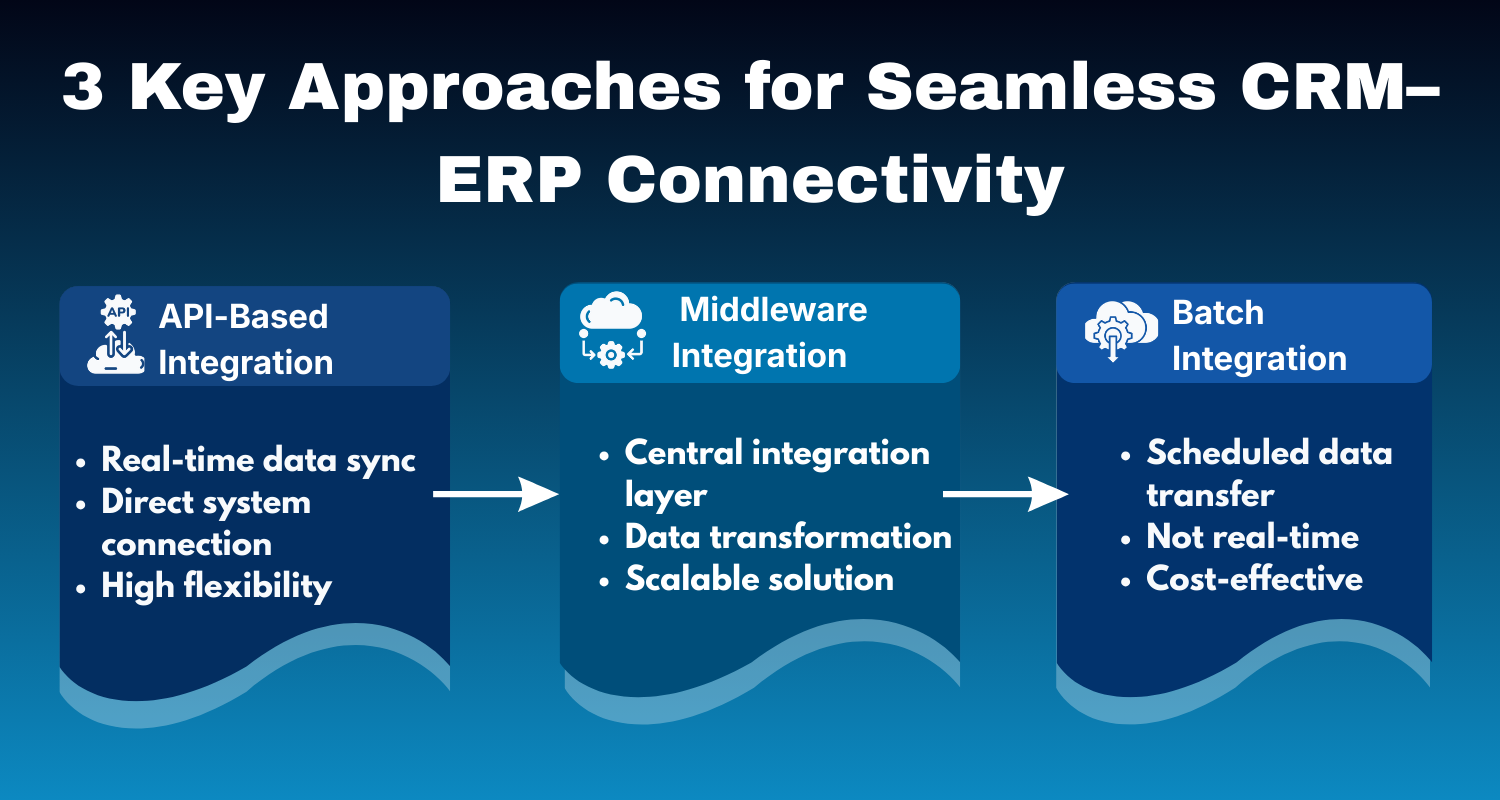
- Organizations can integrate Salesforce with ERP systems using different methods based on their technical requirements, system architecture, and business processes. The most common approaches include API-based integration, middleware integration, and batch integration, each suited for different levels of data synchronization, complexity, and scalability needs.
1. API-Based Integration
- API-based integration is one of the most common methods used to connect Salesforce with ERP systems. This approach uses application programming interfaces (APIs) to allow both platforms to communicate and exchange data directly.
- Salesforce provides a wide range of APIs, including REST APIs, SOAP APIs, and Bulk APIs, which allow developers to build custom integrations based on specific business needs.
- With API-based integration, data can be synchronized in real time, enabling immediate updates between Salesforce and the ERP system. For example, when a sales opportunity is converted into an order in Salesforce, the order information can be instantly sent to the ERP system for processing and fulfillment.
- Similarly, updates related to invoices, inventory levels, or order status from the ERP system can be reflected back in Salesforce.
- This approach offers a high level of flexibility and is well suited for organizations that require complex workflows, real-time synchronization, and customized integration logic. However, API-based integration often requires experienced developers to design, implement, and maintain the integration architecture.
2. Middleware Integration
- Middleware integration uses an intermediate platform to connect Salesforce with ERP systems. Middleware solutions act as a bridge that manages communication between multiple applications, allowing organizations to integrate systems without building direct connections between each platform.
- Middleware platforms provide several capabilities that simplify integration projects. These include data transformation, workflow automation, system orchestration, monitoring tools, and prebuilt connectors for common enterprise applications.
- By using middleware, businesses can reduce the complexity of integration while improving scalability and maintainability. This approach is particularly beneficial for organizations that operate multiple systems and require centralized integration management.
- Instead of building separate integrations for each application, middleware platforms allow companies to create a unified integration architecture that connects Salesforce with ERP systems and other enterprise tools. Because of its scalability and flexibility, middleware integration is widely used in enterprise environments.
3. Batch Integration
- Batch integration is another method used to synchronize data between Salesforce and ERP systems. In this approach, data is transferred between systems at scheduled intervals rather than in real time.
- Batch integration typically involves extracting data from one system, transforming it into the required format, and loading it into the target system through scheduled processes.
- This method is often used when immediate synchronization is not necessary. For example, organizations may choose to update financial records, inventory levels, or reporting data once every few hours or at the end of the day. Batch integration can help reduce system load and simplify integration processes, especially for large datasets that do not require real-time updates.
- Although batch integration may not provide instant data synchronization, it can be a cost-effective and reliable solution for many businesses. When designed properly, batch integration ensures that critical data remains consistent across systems while minimizing the complexity of real-time integrations.
Challenges in Salesforce ERP Integration
- Although integrating Salesforce with ERP systems offers numerous benefits, organizations may encounter certain challenges during implementation. One of the most significant challenges is Data mapping, which involves aligning data structures between Salesforce and ERP platforms. Because each system may store information in different formats, careful planning is required to ensure accurate data synchronization.
- Security is another important consideration. Since integration involves the transfer of sensitive financial and customer data, organizations must implement robust security measures to protect data during transmission.
- Performance optimization is also critical when integrating systems that process large volumes of data. Poorly designed integration architecture can lead to system performance issues and delays in data synchronization.
- Additionally, maintaining integration over time requires continuous monitoring and updates. As systems evolve and business requirements change, organizations must ensure that integration processes remain stable and efficient.
What Are the Best Practices for Successful Salesforce ERP Integration?
- Successful Salesforce ERP integration requires careful planning and a well-defined strategy. Organizations should begin by identifying the specific business processes that require integration and defining clear objectives for the integration project.
- It is also important to select the appropriate integration architecture based on the organization's technical environment and scalability requirements.
- Establishing strong data governance policies helps ensure data accuracy and consistency across systems.
- Testing plays a crucial role in the integration process. Before deploying integration solutions in production environments, organizations should conduct thorough testing to verify that data synchronization works correctly and that workflows function as expected.
- By following these best practices, businesses can reduce risks and maximize the benefits of Salesforce ERP integration.
Why Choose Expro Softech for Salesforce ERP Integration
- Implementing Salesforce ERP integration requires strong expertise in Salesforce architecture, data integration, and business process optimization. Organizations often need a well-planned integration strategy to ensure that CRM and ERP systems communicate seamlessly while maintaining data accuracy, security, and performance.
- At Expro Softech, we help businesses successfully integrate Salesforce with ERP systems to create a connected and efficient digital ecosystem. Our team works closely with organizations to design integration strategies that align with their operational processes and technology infrastructure.
- From defining integration architecture to implementing secure data synchronization, we ensure that Salesforce and ERP platforms work together smoothly.
- Our services include developing integration strategies, implementing ERP integrations, building custom APIs, automating data synchronization, and optimizing system performance.
- With our deep expertise in Salesforce development and integration, we help businesses eliminate data silos, streamline workflows, and unlock the full potential of their CRM and ERP systems to support long-term business growth.
Conclusion
Salesforce ERP integration plays a crucial role in helping organizations connect customer-facing activities with operational processes. By integrating CRM and ERP systems, businesses can eliminate data silos, automate workflows, and gain better visibility across departments.
As organizations continue to adopt digital transformation strategies, integrating Salesforce with ERP systems becomes essential for building scalable and efficient technology ecosystems. Businesses that invest in well-designed integration strategies can improve operational efficiency, enhance customer experiences, and gain a competitive advantage in today's digital marketplace.