 Neel Thakkar

Salesforce helps businesses manage customer relationships, streamline operations, and make data-driven decisions. As organizations customize Salesforce to meet their business needs, Lightning Web Components (LWC) play an important role in creating interactive and user-friendly applications. However, components that load slowly, display information with delays, or respond poorly to user actions can interrupt workflows and affect employee productivity. This makes performance optimization an important part of building efficient Salesforce applications.
Optimizing Lightning Web Components performance does not always require complex code changes. Developers can improve efficiency by retrieving only the necessary data, reducing unnecessary server requests, managing large datasets, and avoiding excessive rendering. In this blog, we will explore the common causes of slow LWC components and discuss practical optimization techniques, the role of Lightning Data Service, and ways to identify performance issues and measure improvements.
What Is LWC in Salesforce and Why Does Performance Matter?
Lightning Web Components (LWC) is a Salesforce framework that helps developers build custom interfaces using modern web technologies. It allows businesses to create features beyond standard Salesforce layouts to meet specific requirements.
- LWC components can display related records, filter customer information, show sales metrics, and allow users to update records. These tasks may involve data retrieval, JavaScript processing, and interface rendering.
- Performance becomes important when components handle large datasets or multiple operations. For example, a sales dashboard that retrieves opportunity records, calculates totals, and displays charts may load slowly if these operations are inefficient.
- A component's performance depends on several factors, including server requests, data volume, JavaScript complexity, and the amount of content rendered in the browser.
- Consider a component that displays Salesforce case records. Retrieving thousands of cases when users need only a filtered list can create unnecessary work. Fetching relevant records and displaying them in manageable groups can help reduce this overhead.
- Performance issues may also occur when multiple components request similar information or repeatedly update their interfaces. Reviewing how components share data and respond to changes can help identify optimization opportunities.

Good LWC performance can deliver several benefits:
- Reduced data retrieval overhead: Requesting only the necessary records and fields reduces the amount of data transferred and processed, especially when working with large Salesforce objects.
- More efficient server communication: Reviewing repeated Apex calls and choosing suitable data access methods can reduce unnecessary requests and communication delays.
- Better handling of large datasets: Pagination and loading records when needed help prevent components from rendering too much information at once, particularly in custom tables and record lists.
- Improved browser responsiveness: Avoiding expensive calculations and unnecessary interface updates reduces browser processing, helping users interact more smoothly with data-heavy components.
- Easier performance troubleshooting: Clear component structures and organized data flows help developers identify whether delays come from data retrieval, server-side processing, or browser rendering.
Performance optimization is not just about making components load faster. It involves ensuring that data retrieval, processing, and interface updates work efficiently for the component's purpose.
Key Performance Challenges in Lightning Web Components
Before making improvements, developers need to understand what might be causing a component to perform poorly. Different components can experience different problems depending on the amount of data they handle and the work they perform.
1. Retrieving Unnecessary Data
- Components may retrieve more records or fields than required, increasing the amount of data transferred and processed.
- Fetching unnecessary information can create additional workload and affect component performance, especially when working with large Salesforce objects.
- For example, a component displaying a customer's name and account status does not need to retrieve every available field from the customer record.
- Developers can improve efficiency by requesting only the fields and records needed for the component's functionality.
2. Making Repeated Server Requests
- Components may request the same information multiple times instead of reusing data that is already available.
- Repeated requests can increase communication time and create additional processing work for Salesforce.
- This issue can become more noticeable when multiple components on the same page require similar information.
- Developers can reduce unnecessary requests by using appropriate data services, caching strategies, and efficient data retrieval methods.
3. Displaying Too Many Records
- Displaying hundreds or thousands of records at once can increase browser processing and affect component responsiveness.
- Large tables may take longer to load and can become difficult to scroll through or interact with smoothly.
- Loading only the required records initially can help reduce rendering work and improve the user experience.
- Developers can use pagination, filtering, or load-more functionality to manage large datasets efficiently.
4. Performing Unnecessary Calculations
- Components may repeatedly calculate summary values or process lists even when the underlying data has not changed.
- These unnecessary operations can increase JavaScript processing and affect how quickly the interface responds.
- For example, recalculating the same dashboard totals after every unrelated user interaction can create avoidable work.
- Developers should review their JavaScript logic and perform calculations only when the relevant data or conditions change.
5. Using Complex Component Structures
- Components with excessive nesting or too many responsibilities can make an application harder to maintain and troubleshoot.
- Complicated data flows between components may introduce unnecessary processing or make updates more difficult to manage.
- For example, dividing a simple interface into too many dependent components can add complexity without providing meaningful benefits.
- Developers should organize components around clear responsibilities and keep communication between them straightforward.
6. Ignoring the Source of the Delay
- Performance issues do not always originate in the Lightning Web Component itself.
- Slow database queries, inefficient Apex execution, network conditions, and browser rendering can also contribute to delays.
- For example, a component may display information slowly because its Apex method takes too long to retrieve records, even when its interface is well designed.
- Developers should investigate network requests, server-side processing, and browser activity to identify the actual cause before making changes.
Effective Ways to Optimize Lightning Web Components Performance
The following practices can help developers improve component efficiency while keeping their Salesforce applications maintainable and user-friendly.
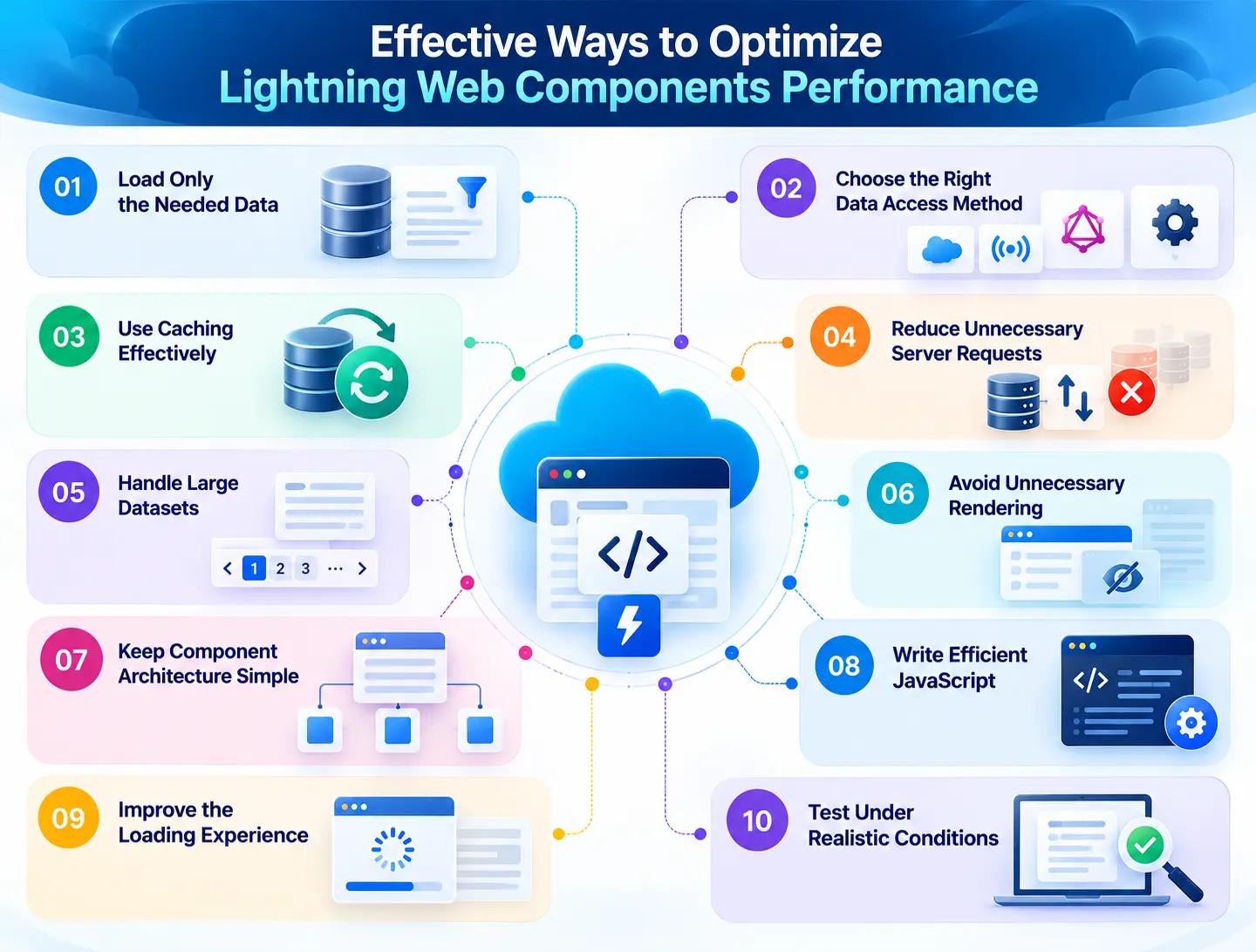
1. Load Only the Data You Need
- Retrieve only the records and fields required for the component to perform its intended task.
- Avoid fetching unnecessary information because it increases the amount of data transferred and processed.
- For example, a component displaying open sales opportunities may need only the opportunity name, expected close date, and sales stage.
- Apply appropriate filters and review SOQL queries to avoid retrieving unused records and fields.
- Choose a suitable Salesforce data access method to retrieve the required information efficiently.
2. Select the Appropriate Data Access Method
- Salesforce provides several data access options, including Lightning Data Service, wire adapters, GraphQL, and Apex.
- Use standard Salesforce components when they already provide the functionality required by your application.
- Consider Lightning Data Service for supported record operations and wire adapters for reactive data retrieval.
- Use GraphQL when its query capabilities suit the requirement to retrieve multiple related pieces of information.
- Choose Apex when custom server-side processing or data access requirements cannot be handled adequately by standard Salesforce data services.
- Select the method that best meets your application's functionality, security, and performance requirements.
3. Use Caching Effectively
- Caching allows suitable data to be reused instead of requesting the same information from Salesforce repeatedly.
- Use Lightning Data Service when appropriate to benefit from its client-side caching and shared record data.
- Apply @AuraEnabled(cacheable=true) to suitable read-only Apex methods to allow their results to be cached on the client.
- Avoid making repeated requests when the required information is already available and can be reused appropriately.
- Refresh data when necessary to ensure users see updated information after records change.
- Remember that cached data does not have a guaranteed fixed expiration time, so follow Salesforce's data-refresh guidance.
4. Reduce Unnecessary Server Requests
- Avoid requesting the same information multiple times when it can be reused appropriately.
- Review event handlers that trigger Apex calls and remove requests that are not necessary for the user's action.
- For search components, consider waiting until users pause typing before sending a request, where appropriate.
- Use suitable caching and data-sharing techniques to reduce duplicate requests.
- Combine related data retrieval operations when the selected approach supports it.
- Avoid repeatedly refreshing data when the underlying information has not changed and a refresh is not required.
5. Handle Large Datasets Efficiently
- Avoid retrieving and displaying thousands of records simultaneously when users only need a smaller set of relevant information.
- Use pagination to divide records into manageable groups and make large lists easier to navigate.
- Apply filters to help users find the records relevant to their tasks.
- Load additional records when users request them or reach the appropriate point in a list.
- Remove unnecessary columns from data tables to reduce interface complexity.
- Use efficient queries to retrieve records according to the application's requirements while preserving access to the information users need.
6. Avoid Unnecessary Component Rendering
- Keep template expressions simple to avoid unnecessary complexity when the interface updates.
- Avoid repeating expensive calculations during rendering when the results can be reused appropriately.
- Use conditional rendering to display interface sections only when they are required.
- Update component state only when relevant information changes.
- Review whether complex interface elements need to be rendered immediately or can be displayed when needed.
- Use stable, unique keys when rendering lists so Lightning Web Components can identify list items correctly when the data changes.
7. Keep Component Architecture Simple and Reusable
- Give each component a clear responsibility so its functionality remains easy to understand and maintain.
- Reuse components when they provide common functionality across different parts of a Salesforce application.
- Avoid unnecessary component nesting that adds complexity without providing a clear benefit.
- Keep communication between parent and child components straightforward.
- Review whether data is being passed between components unnecessarily or processed more than once.
- Evaluate component performance in the context of the complete page, especially when multiple instances of the same component are displayed.
8. Write Efficient JavaScript and Event Handlers
- Avoid repeating the same calculations when the underlying data has not changed.
- Keep event handlers focused on the specific user action they need to perform.
- Avoid unnecessary loops over large collections of records.
- Reuse suitable calculated results when doing so prevents repeated processing.
- Identify expensive JavaScript operations before changing the code.
- Consider more efficient algorithms or processing smaller amounts of data when large collections cause delays.
9. Improve the Loading Experience
- Display an appropriate loading indicator when a component takes time to retrieve or process information.
- Show useful content as soon as the required information becomes available.
- Avoid blocking the entire interface when only one component or section is loading.
- Provide clear messages when a search returns no matching records.
- Handle errors gracefully and explain when an operation could not be completed.
- Remember that loading indicators improve feedback and perceived responsiveness, but they do not necessarily reduce actual processing time.
10. Test Performance Under Realistic Conditions
- Test components with realistic record volumes instead of relying only on small sample datasets.
- Evaluate common user activities, such as searching, filtering, opening records, and updating information.
- Check how components behave when multiple components are loaded on the same Salesforce page.
- Test on supported browsers and devices to identify differences in responsiveness.
- Review network conditions when they are relevant to the performance issue.
- Compare performance before and after optimization under similar testing conditions.
- Confirm that improvements do not introduce problems with functionality, data accuracy, security, or data freshness.
Common LWC Performance Mistakes to Avoid
Even when developers follow performance best practices, certain mistakes can affect how efficiently Lightning Web Components work.
- Retrieving every available field or record instead of only the information required can increase data transfer and processing time.
- Using Apex for every data operation can introduce unnecessary complexity when standard Salesforce components or Lightning Data Service can handle the requirement.
- Displaying too many records simultaneously can increase browser rendering work and make tables or lists less responsive.
- Relying entirely on caching may not resolve performance issues caused by inefficient database queries, expensive JavaScript operations, or large datasets.
- Making code changes without measuring performance can waste development time and fail to address the actual source of the delay.
- Optimizing an individual component without considering the complete Salesforce page can overlook delays caused by other components, server requests, or page-level processes.
- Performing unnecessary calculations whenever users interact with a component can increase JavaScript processing and affect responsiveness.
- Complex template logic can make components more difficult to maintain and increase the work required to render them.
- Ignoring error handling and loading states can leave users uncertain about whether a component is processing information or has encountered a problem.
- Testing components only with a small number of sample records can hide performance issues that appear when the application handles realistic data volumes.
Avoiding these mistakes helps developers identify the actual causes of performance issues and focus on improvements that make Lightning Web Components more efficient and responsive.
How to Find and Fix LWC Performance Problems
When a component becomes slow, developers should first determine where the delay occurs. A structured investigation makes it easier to identify the problem and select an appropriate solution.
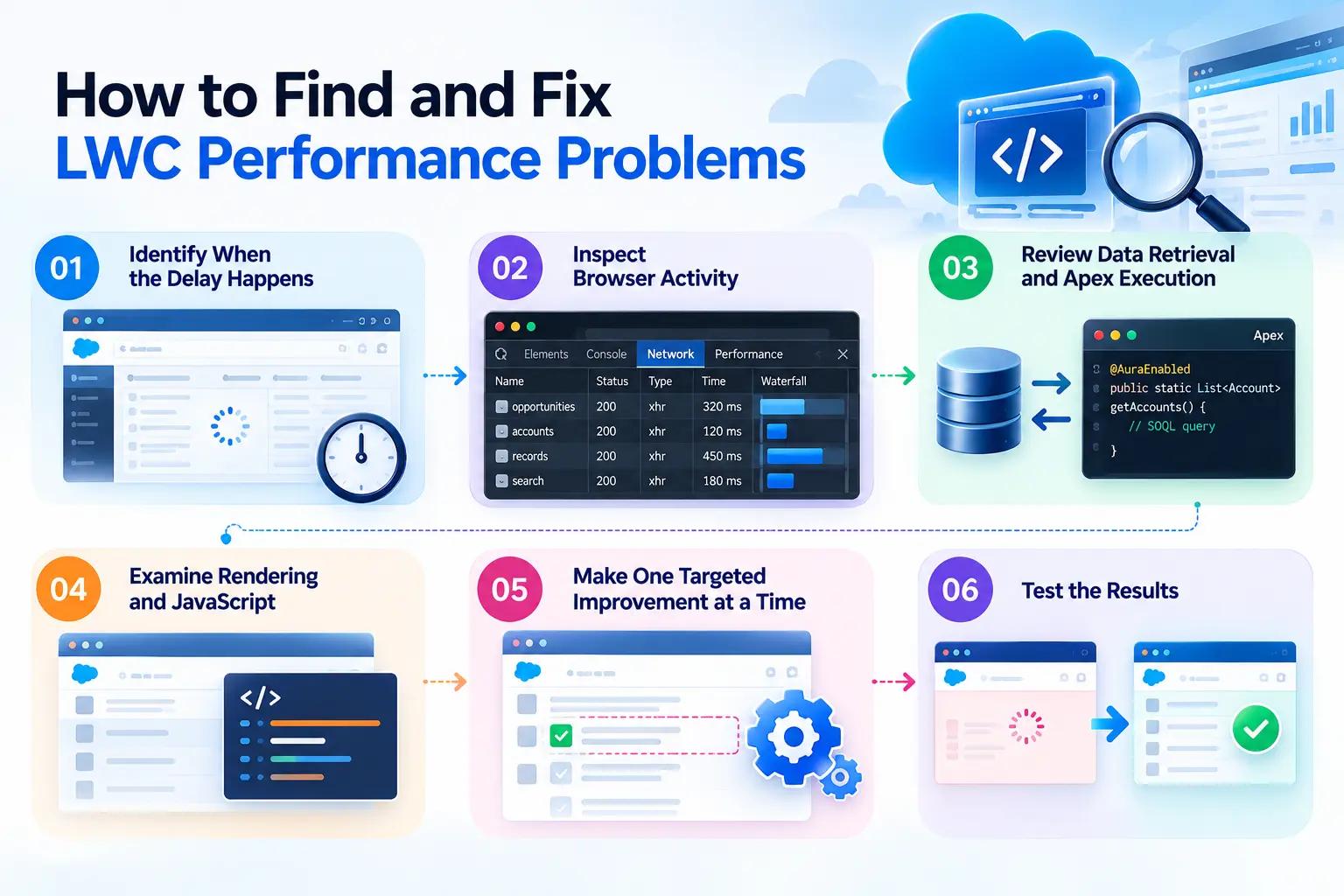
Step 1: Identify When the Delay Happens
- Observe the component during common user activities to understand when performance issues occur.
- Check whether the page loads slowly, search results take too long to appear, or large tables become unresponsive.
- Identifying when the delay occurs helps developers narrow down the possible causes and focus their investigation.
Step 2: Inspect Browser Activity
- Use Chrome DevTools to examine network requests, JavaScript execution, and browser rendering.
- Check the Network panel for slow requests or repeated communication between the browser and Salesforce.
- Use the Performance panel to investigate processing delays and rendering activity that may affect responsiveness.
- Review the collected information to identify potential bottlenecks instead of relying only on the application's visible behavior.
Step 3: Review Data Retrieval and Apex Execution
- Examine the data retrieval methods and queries used by the component when delays appear to be related to Salesforce data.
- Check whether the component retrieves unnecessary records, makes repeated requests, or executes inefficient database queries.
- Check whether Apex code is causing delays in server-side processing.
- Investigate both browser activity and server-side operations when the cause cannot be identified from the component alone.
Step 4: Examine Rendering and JavaScript
- Investigate browser rendering when data loads quickly but the component still responds slowly.
- Check whether large lists, complex templates, or repeated calculations increase the browser's workload.
- Review event handlers to identify operations that take too long or perform unnecessary processing.
- Simplify inefficient operations where possible to help the component respond more smoothly.
Step 5: Make One Targeted Improvement at a Time
- Address the identified performance issue with a focused change, such as retrieving fewer fields or improving a database query.
- Consider displaying fewer records initially when a component handles a large dataset.
- Make one meaningful change at a time so developers can understand which adjustment affects performance.
- Avoid changing unrelated parts of the component without evidence that they contribute to the problem.
Step 6: Test the Results
- Repeat the same user workflow under comparable conditions to evaluate the effect of the changes.
- Compare loading time, request behavior, and interface responsiveness before and after optimization.
- Verify that the component continues to display accurate information and maintains its expected functionality and security.
- If the delay persists, investigate other possible causes and make further changes based on the findings.
Understanding the Role of Lightning Data Service in LWC Performance
- Lightning Data Service (LDS) helps Lightning Web Components access, create, update, and manage supported Salesforce records without requiring developers to build custom data retrieval logic for every operation.
- One of its key advantages is client-side caching, which allows suitable record data to be reused instead of repeatedly requesting the same information from Salesforce.
- LDS can share cached record data across components that use Lightning Data Service, helping reduce unnecessary server requests and improve responsiveness.
- For example, an account page may contain one component displaying account details and another showing related account information, with both components needing access to the same record.
- When both components use appropriate Lightning Data Service features, they can benefit from shared cached record data rather than independently retrieving the same information.
- LDS also helps keep supported record data consistent by notifying relevant components when records change through supported data operations.
- Using Lightning Data Service where appropriate can simplify data management, reduce repetitive code, and help developers build more efficient Salesforce applications.
- Developers can use standard components such as lightning-record-form and lightning-record-edit-form to create and update records without implementing every operation manually.
- LDS supports Salesforce's record-level security and sharing behavior, helping ensure that data access follows the user's permissions.
- For requirements involving custom server-side logic or unsupported data operations, developers may need Apex or another suitable data access method instead of relying solely on LDS.
How Does Lightning Data Service Benefit Salesforce Applications?
1. Reuse available record data
- Lightning Data Service (LDS) stores supported record data in a client-side cache for reuse.
- Components can access cached information instead of requesting the same data from Salesforce again.
- Reusing cached data helps reduce unnecessary server requests and improve component responsiveness.
- Multiple components using LDS can share cached record data, reducing duplicate data retrieval.
- LDS helps keep supported record data consistent by notifying relevant components when records change through supported data operations.
2. Reduce Unnecessary Server Requests
- Lightning Data Service (LDS) manages supported data requests to reduce unnecessary communication with Salesforce.
- It can share cached record data across components that use LDS.
- Reusing cached data helps prevent the same information from being requested repeatedly.
- LDS can reduce duplicate data requests by sharing supported record data across components.
- Fewer unnecessary server requests can help components retrieve data more efficiently and respond faster.
3. Simplify Record Operations
- Standard Salesforce components such as lightning-record-form and lightning-record-edit-form simplify common record operations.
- Developers can use these components to display, create, and edit records without building every operation from scratch.
- These components handle many standard record interactions, reducing the need for custom implementation.
- Lightning Data Service manages supported record operations and helps handle data access consistently.
- Using standard components where appropriate can reduce repetitive code and make applications easier to maintain.
4. Support Consistent User Interfaces
- Lightning Data Service helps keep supported record data consistent across components that use LDS.
- When a record changes through a supported operation, relevant components can receive updates to the affected data.
- This reduces the need to manually manage every record update across the interface.
- Shared record data helps components display consistent information when they use the same supported data source.
- Developers should still handle data refresh appropriately when updates occur through operations that LDS does not manage automatically.
How Does Lightning Data Service Improve Salesforce Performance?

Lightning Data Service (LDS) helps improve Lightning Web Components (LWC) performance by managing supported record data efficiently. It reduces repetitive data retrieval and simplifies common record operations, helping developers build responsive Salesforce applications.
- Reuse Cached Record Data: LDS stores supported record data in a client-side cache, allowing components to reuse available information instead of repeatedly requesting the same records from Salesforce.
- Reduce Unnecessary Server Requests: By sharing cached data across components that use LDS, it can reduce duplicate requests and improve data retrieval efficiency.
- Simplify Record Management: Standard components such as lightning-record-form and lightning-record-edit-form simplify common record operations without requiring extensive custom code.
- Keep Record Data Consistent: LDS helps update components that use supported record data when changes occur through supported data operations, reducing the need for manual synchronization.
- Improve Component Responsiveness: Reusing cached data and reducing unnecessary requests can help components display information more efficiently.
- Reduce Custom Code: Using standard LDS features for supported record operations can reduce repetitive coding and make components easier to maintain.
- Support Better User Experiences: Efficient data access and simpler record management can help create smoother interactions for users working with Salesforce applications.
Benefits of Optimizing LWC Performance for Businesses
1. Improved Employee Productivity
- Faster-loading Lightning Web Components help employees access Salesforce records with less waiting time.
- Responsive components allow employees to complete daily tasks more smoothly.
- Efficient data access helps users find the information they need without unnecessary delays.
- Reduced interruptions can help employees focus on customer interactions and business activities.
- Improved component performance can support more efficient workflows across different teams.
2. Better User Experience
- Responsive interfaces make Salesforce applications easier and more convenient to use.
- Faster search and filtering help users find relevant records more efficiently.
- Smooth interactions reduce delays when users view or update information.
- Consistent performance helps create a more reliable experience for employees working with Salesforce.
- A better user experience can help employees complete tasks with greater confidence and fewer interruptions.
3. More Efficient Data Access
- Efficient data retrieval helps components obtain the information required for their operations.
- Reducing unnecessary server requests can improve data access efficiency.
- Appropriate caching allows supported record data to be reused instead of retrieved repeatedly.
- Fetching only the necessary information can reduce unnecessary processing.
- Efficient data access can help custom Salesforce applications remain responsive during common business workflows.
4. Easier Application Maintenance
- Well-organized Lightning Web Components are easier for developers to understand and maintain.
- Clear data access patterns help developers identify potential performance issues.
- Reusable code can reduce duplication across components.
- Simpler component structures can make troubleshooting and debugging more manageable.
- Maintainable components help development teams implement future updates with greater confidence.
5. Better Scalability
- Efficient components help Salesforce applications handle growing business requirements more effectively.
- Optimized data retrieval can reduce unnecessary processing as applications become more complex.
- Efficient rendering helps components display records without avoidable delays.
- Performance testing helps identify bottlenecks before they significantly affect users.
- Scalable component design helps businesses adapt their Salesforce applications to changing workloads and workflows.
6. More Reliable Business Processes
- Responsive components help employees access the information needed to complete business tasks.
- Proper data handling helps maintain data accuracy while improving component performance.
- Thorough testing helps ensure that performance changes do not disrupt existing functionality.
- Consistent component behavior can reduce interruptions during important business workflows.
- Reliable and responsive Salesforce applications help teams complete daily operations more efficiently.
How to Measure LWC Performance Before and After Optimization
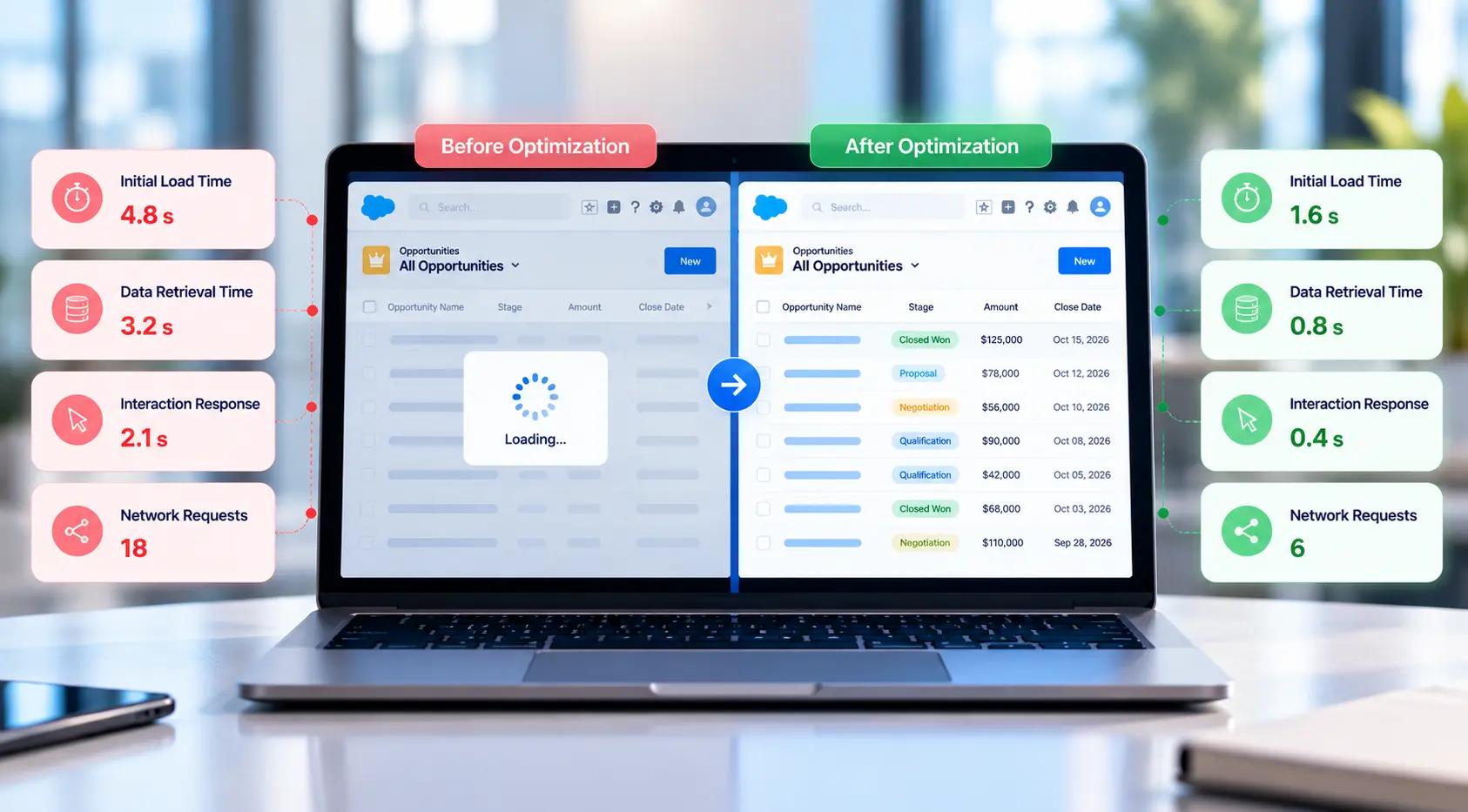
- Performance optimization should be based on measurable results rather than assumptions. Measuring performance before and after changes helps developers understand whether their optimizations have improved the component's actual behavior.
- Establish a performance baseline by recording how the component behaves during a typical user workflow before making changes.
- Measure initial loading time to understand how long users wait before the component becomes usable.
- Check data retrieval time to identify delays in fetching records and displaying relevant information.
- Evaluate interaction responsiveness by measuring how quickly the component responds to user actions such as searching, filtering, or updating records.
- Use tools such as Chrome DevTools to examine network requests, browser processing, rendering behavior, and potential performance bottlenecks.
- Repeat the same tests after optimization using similar data, browser settings, and network conditions to make the comparison more reliable.
- Verify that the changes provide meaningful improvements without affecting essential functionality, data accessibility, or the overall user experience.
- Measuring LWC performance systematically helps identify actual bottlenecks, validate optimization efforts, and ensure that performance improvements benefit Salesforce users in real-world scenarios.
Conclusion
Optimizing Lightning Web Components (LWC) performance helps build efficient Salesforce applications. Efficient data retrieval, caching, reduced server requests, and better rendering can improve responsiveness. Measuring performance before and after optimization helps identify bottlenecks and validate improvements.
At Expro Softech, we focus on building efficient Salesforce solutions through thoughtful component design and effective data management, helping businesses improve application performance and user experience.