 Neel Thakkar

Salesforce is no longer limited to traditional CRM interfaces. With the growing adoption of headless architecture, businesses can connect Salesforce data and business logic with websites, mobile applications, customer portals, AI-powered interfaces, and other external platforms. This approach offers greater flexibility in delivering digital experiences, but it also introduces new security responsibilities. Organizations must ensure that every application connected to Salesforce follows proper security practices.
When Salesforce operates in a headless environment, controlling who can access business data, how applications authenticate, and what information they can retrieve or modify becomes essential. Without proper security measures, organizations may expose sensitive customer information, create unauthorized access points, or lose visibility into external application activities. So, how can businesses maintain strong Salesforce security while taking advantage of headless architecture? Let's explore the key security challenges and seven best practices to build a secure headless Salesforce environment.
Understanding Salesforce Security in a Headless Architecture
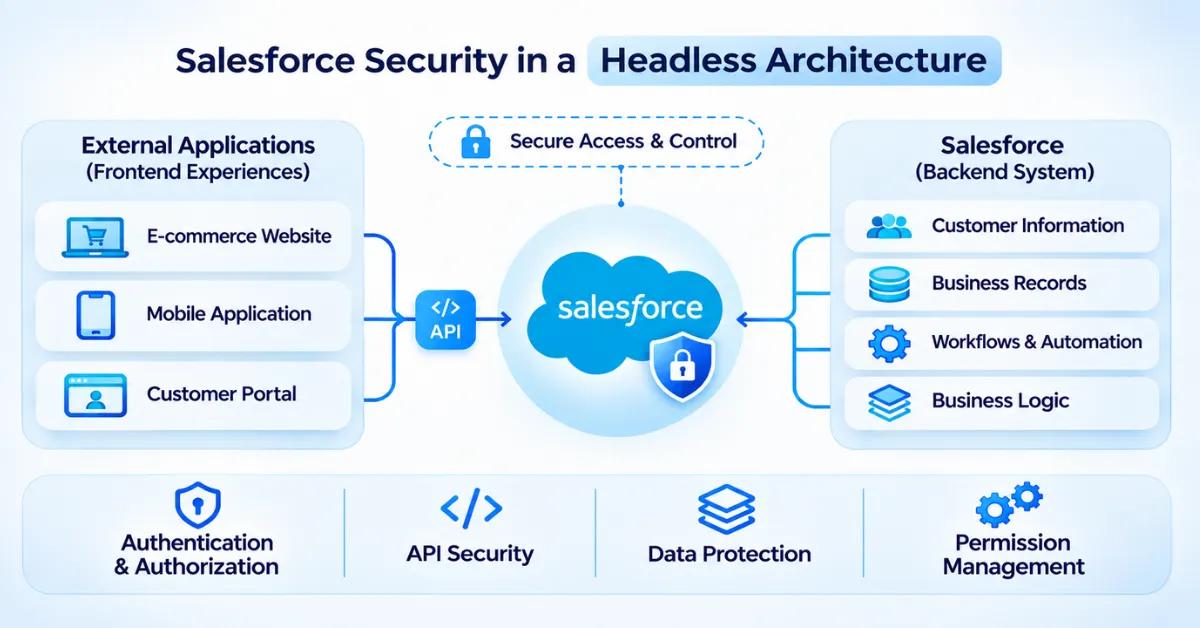
- Headless architecture separates the frontend experience from the backend system, allowing businesses to manage websites, mobile applications, and other digital interfaces independently.
- Instead of relying on a single Salesforce user interface, organizations can connect multiple applications, websites, and customer portals to Salesforce through APIs.
- Salesforce continues to manage customer information, business records, workflows, and business logic, while external applications handle how users interact with that information.
- For example, an e-commerce business can use Salesforce as its central CRM platform while allowing customers to view their accounts, track orders, and submit service requests through a separate website or mobile application.
- External applications communicate with Salesforce through API requests to retrieve customer information, update records, and perform specific business operations based on their assigned permissions.
- Connecting multiple applications to Salesforce introduces additional access points, making authentication, authorization, API security, and data protection essential.
- Organizations must securely manage access tokens, application credentials, and integration endpoints while ensuring that each connected application receives only the permissions required for its operations.
- Regularly reviewing application permissions, monitoring API activities, and enforcing Salesforce security controls across all connected applications helps protect sensitive business information and maintain a secure headless environment.
Key Security Challenges in a Headless Salesforce Environment
Before implementing security measures, organizations need to understand the risks associated with external application connections.
Here are five common challenges to consider.
1. Unauthorized API Access
- External applications use Salesforce APIs to retrieve, update, and manage CRM data.
- Improper API access configurations can allow applications to request information beyond their intended requirements.
- Weak authentication mechanisms may increase the risk of unauthorized access to Salesforce resources.
- Exposed API credentials or access tokens can create opportunities for malicious users to access connected systems.
- Without proper API restrictions and monitoring, organizations may struggle to identify and prevent unauthorized requests.
2. Exposure of Sensitive Customer Data
- External applications may access customer details, contact information, transaction records, and other sensitive Salesforce data.
- Inadequate data access restrictions can expose information to users who do not have permission to view it.
- Returning unnecessary fields in API responses can increase the risk of sensitive information exposure.
- Improperly configured sharing rules and field permissions may allow unintended access to customer records.
- Without appropriate data protection measures, organizations may struggle to maintain customer data confidentiality across connected applications.
3. Weak Authentication and Authorization
- External applications require proper authentication to establish trusted connections with Salesforce.
- Weak authentication configurations may allow unauthorized users or applications to access Salesforce resources.
- Incorrect OAuth configurations can provide applications with broader access than their business requirements.
- Poor permission management may allow authenticated users to perform operations they are not authorized to perform.
- Without proper authentication and authorization controls, organizations may face increased risks of unauthorized access and data misuse.
4. Improper Management of Access Tokens and Credentials
- External applications use access tokens, client secrets, and other credentials to establish connections with Salesforce.
- Storing sensitive credentials in frontend code or unsecured locations can make them accessible to unauthorized users.
- Reusing the same credentials across multiple integrations can make it difficult to control application access.
- Expired, exposed, or improperly managed tokens may create security gaps in connected applications.
- Without secure credential storage and regular token management, organizations may increase the risk of unauthorized access to Salesforce data.
5. Limited Visibility into External Application Activities
- Multiple external applications can generate API requests and access Salesforce resources simultaneously.
- Without proper monitoring, organizations may have difficulty identifying which applications are accessing specific Salesforce resources.
- Unusual API request patterns or repeated authentication failures may indicate potential security issues.
- Limited audit visibility can make it harder to investigate unauthorized access or unexpected data changes.
- Without regular activity monitoring, organizations may overlook suspicious behavior and potential security vulnerabilities.
How Security Works Across a Headless Salesforce Architecture
- When a website, mobile application, or customer portal connects to Salesforce, it creates a communication channel to access specific CRM data and business functionality.

- Every application must have a properly configured authentication mechanism to establish a trusted connection with Salesforce.
- OAuth 2.0 helps manage application authorization by issuing access tokens that allow approved applications to interact with Salesforce APIs.
- Salesforce applies its security permissions to determine whether the connected user or integration can perform the requested operations.
- Object permissions, Field-Level Security, and record-level access controls help restrict access to sensitive customer and business information.
- External applications should retrieve only the data required for their intended functionality instead of requesting unnecessary Salesforce information.
- Secure communication channels, protected credentials, and server-side validation help reduce the risk of unauthorized access and data exposure.
- API access policies can help organizations restrict which applications are allowed to communicate with Salesforce and what level of access they can request.
- Regular monitoring of API activity, application permissions, and authentication events helps organizations maintain visibility and control over their connected Salesforce environment.
- Periodic security reviews help identify outdated configurations, unnecessary permissions, and potential vulnerabilities across connected applications.
7 Best Practices to Secure Salesforce in a Headless Architecture
Maintaining Salesforce security in a headless environment requires multiple layers of protection. The following seven practices can help organizations manage application access, protect customer information, and reduce security risks.
1. Implement Strong Authentication Using OAuth 2.0
- External applications connecting to Salesforce need a reliable authentication mechanism to verify their identity and establish authorized access.
- OAuth 2.0 provides a standard authorization framework that allows applications to access Salesforce resources through approved authorization flows without directly sharing user passwords.
- Access tokens help applications make authorized API requests while controlling access to specific Salesforce resources.
- For example, an e-commerce website connected to Salesforce must establish an authorized connection before retrieving customer information or updating CRM records.
- Using appropriate OAuth configurations helps organizations manage application access and reduce the risk of unauthorized connections.
What should organizations do?
- Use an OAuth 2.0 flow that matches the application's use case.
- Configure appropriate OAuth scopes to limit the access requested by each application.
- Use secure callback URLs and validate redirect destinations.
- Apply appropriate token and session policies.
- Avoid exposing client secrets or access tokens in browser-side code.
Implementing OAuth 2.0 with appropriate authorization settings helps protect Salesforce resources and ensures that only approved applications can establish authorized connections.
2. Apply the Principle of Least Privilege
- Not every external application or integration requires access to all Salesforce records, objects, and business operations.
- Assigning excessive permissions to applications can increase the risk of unauthorized data access and misuse.
- Salesforce provides permission sets and other access controls to manage what users and integration accounts can view or modify.
- For example, a customer portal may need access to customer profile information and service records but should not have permission to access internal financial data.
- Applying the principle of least privilege helps organizations limit unnecessary access and reduce potential security risks.
What should organizations do?
- Create dedicated integration users for different applications where appropriate.
- Provide each integration user with access according to the tasks they need to perform.
- Use permission sets to control object and field-level access.
- Avoid granting unnecessary administrative permissions to integration users.
- Periodically assess assigned access rights to identify and remove unnecessary permissions.
Applying least-privilege access helps organizations maintain better control over Salesforce resources and reduces the impact of potential security breaches.
3. Protect Sensitive Data with Salesforce Access Controls
- Headless applications may access different types of Salesforce information, including customer details, account records, contact information, and transaction data.
- Without appropriate access restrictions, external applications may expose sensitive information to users who are not authorized to view it.
- Salesforce provides security features such as Object-Level Security, Field-Level Security, and record-level access controls to manage data visibility.
- For example, a customer-facing application may display customer names and contact details without exposing confidential business information.
- Applying these security controls helps organizations maintain consistent data access policies across Salesforce and connected applications.
What should organizations do?
- Configure object permissions according to application requirements.
- Configure field permissions to prevent unauthorized access to confidential Salesforce information.
- Apply appropriate organization-wide defaults and sharing rules.
- Ensure users can access only the Salesforce records relevant to their roles.
- Avoid returning unnecessary or sensitive fields in API responses.
Properly configured Salesforce access controls help protect customer information and maintain data confidentiality across connected applications.
4. Secure API Tokens and Application Credentials
- External applications use access tokens, client secrets, and other credentials to establish authorized connections with Salesforce.
- If these credentials are exposed or stored in unsecured locations, unauthorized users may gain access to connected Salesforce resources.
- Storing sensitive tokens in frontend code can make them accessible through browser inspection or other client-side methods.
- Sharing the same credentials across multiple integrations can also make access management and security investigations more difficult.
- Secure credential management helps organizations protect application connections and reduce the risk of unauthorized access.
What should organizations do?
- Store sensitive credentials in secure server-side storage.
- Never expose client secrets or access tokens in frontend code.
- Rotate application secrets and credentials according to security policies.
- Configure appropriate token expiration and revocation practices.
- Restrict credential access to authorized applications and services.
Securely managing application credentials helps protect Salesforce connections and reduces the possibility of credential misuse.
5. Control and Monitor API Access
- APIs allow external applications to communicate with Salesforce and perform different business operations.
- As organizations connect more applications, managing API access becomes essential to prevent unnecessary or unauthorized requests.
- Unrestricted API access can increase the risk of excessive data retrieval, unexpected operations, and misuse of Salesforce resources.
- Monitoring API activity helps organizations understand how connected applications interact with Salesforce.
- Proper API access controls and monitoring provide better visibility into application communication and potential security issues.
What should organizations do?
- Allow only trusted and approved applications to connect with Salesforce.
- Configure API access policies based on application requirements.
- Restrict unnecessary API permissions and operations.
- Monitor API usage and identify unusual request patterns.
- Use appropriate API rate limits and traffic controls through the API gateway or integration layer.
Controlling and monitoring API access helps organizations maintain visibility over connected applications and protect Salesforce resources.
6. Secure Communication Between Salesforce and External Applications
- Salesforce security also depends on the external applications that communicate with its APIs and access its data.
- Websites, mobile applications, and customer portals must follow secure development practices to prevent unauthorized access and information exposure.
- Insecure communication channels can expose sensitive information while data moves between Salesforce and external applications.
- For example, a customer portal with poorly protected backend endpoints may expose customer information even when Salesforce permissions are correctly configured.
- Securing both Salesforce and external applications helps organizations maintain protection across the entire connected environment.
What should organizations do?
- Use HTTPS to protect data transmitted between applications.
- Keep sensitive authentication processes on trusted backend services.
- Validate incoming API requests before processing them.
- Apply authorization checks to every protected operation.
- Protect external endpoints against common application security threats.
Securing external applications and communication channels helps reduce security gaps and protects information exchanged between connected systems.
7. Conduct Regular Security Audits and Reviews
- Security configurations can change as organizations introduce new applications, integrations, and business requirements.
- Outdated permissions, inactive integration accounts, and improperly configured authentication settings can create potential security risks.
- Regular security audits help organizations identify configuration issues and review how external applications access Salesforce resources.
- Salesforce provides auditing capabilities such as Login History, Setup Audit Trail, and Field History Tracking to support security reviews.
- Continuous reviews help organizations maintain better visibility into application access and identify areas that require security improvements.
What should organizations do?
- Review active external applications and their assigned permissions.
- Check integration users and their permission sets regularly.
- Review OAuth configurations and token management policies.
- Monitor API activities and investigate unusual access patterns.
- Remove unused integrations and update outdated credentials.
Regular security audits help organizations maintain effective access controls and keep their headless Salesforce environment aligned with changing security requirements.
How to Build a Secure Headless Salesforce Integration
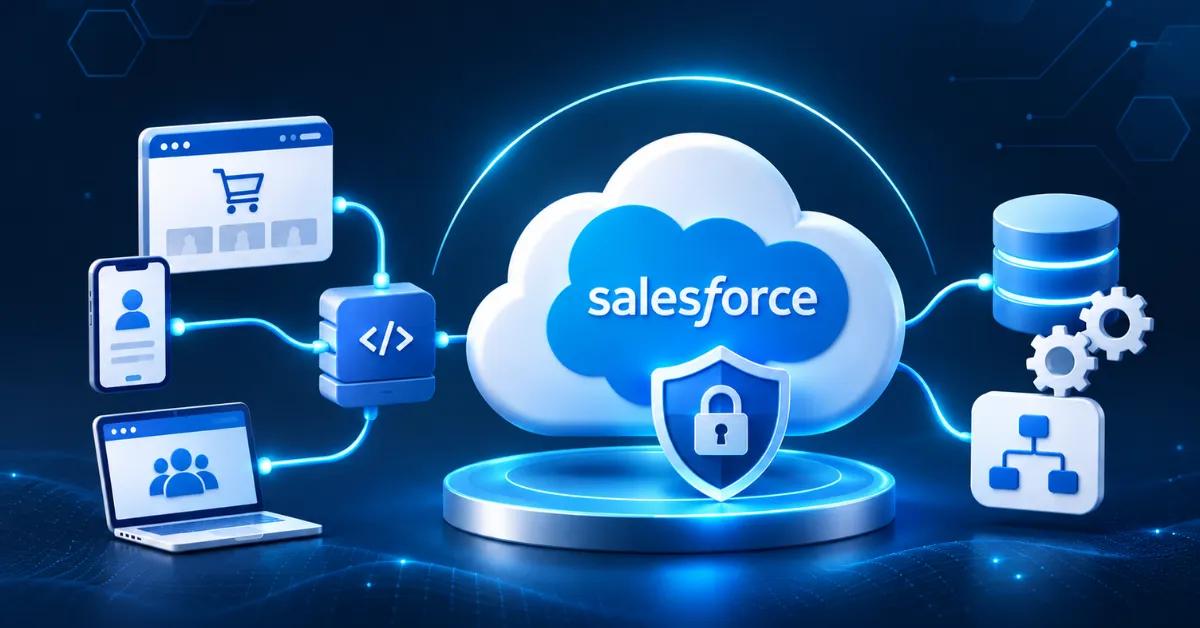
- Identify all external applications, websites, mobile apps, and customer portals that need to connect with Salesforce. Define their integration requirements and determine what Salesforce resources each application needs to access.
- Establish appropriate authentication and authorization methods to verify application identities before allowing access. Ensure that only trusted and approved applications can establish connections with Salesforce.
- Configure API access permissions according to each application's business requirements. Restrict access to the necessary Salesforce objects, records, and fields instead of granting unnecessary permissions.
- Protect customer information during data exchange between Salesforce and external applications. Use secure communication channels, validate API requests, and avoid exposing sensitive information through application responses.
- Store application credentials, client secrets, and access tokens in secure locations rather than exposing them in frontend code. Review credential access regularly and follow appropriate token expiration and rotation policies.
- Implement proper request validation and error handling to manage API communication securely. Ensure external applications handle unexpected requests and API responses without exposing sensitive business information.
- Monitor integration activities and review API usage to identify unusual access patterns or unexpected requests. Regular monitoring helps organizations maintain visibility into how external applications interact with Salesforce.
- Test integration security before deployment and whenever significant application changes are introduced. Regularly review security configurations to ensure that connected applications continue to follow Salesforce security requirements.
Common Salesforce Security Mistakes to Avoid in a Headless Environment
Even with the right security practices, certain implementation mistakes can create unnecessary risks.
Here are some common mistakes organizations should avoid:
1. Exposing Access Tokens in Frontend Code
- Storing access tokens directly in frontend JavaScript can make sensitive credentials visible through browser inspection.
- Exposed tokens may allow unauthorized users to access Salesforce resources and retrieve business information.
- Keeping client secrets in frontend code increases the risk of credential theft and misuse.
- Applications that do not protect authentication details properly may create additional security vulnerabilities.
- Organizations should manage sensitive tokens and credentials through secure backend services instead of exposing them in browser-side code.
2. Giving Applications Excessive Permissions
- Granting external applications unnecessary permissions can expose Salesforce records beyond their intended business requirements.
- Applications with broad access may retrieve or modify sensitive customer information without proper authorization.
- Excessive permissions can increase the impact of compromised application credentials.
- Failing to review permission assignments can allow applications to retain access they no longer require.
- Organizations should follow the principle of least privilege and assign only the permissions necessary for each application's operations.
3. Using Shared Integration Accounts
- Using the same integration account across multiple applications can make access management more complicated.
- When different applications share one identity, identifying which application performed a specific action becomes difficult.
- A compromised shared account may expose data across multiple connected applications.
- Shared credentials can also make security investigations and access revocation more challenging.
- Organizations should use dedicated integration users where appropriate to maintain better access control and accountability.
4. Ignoring API Monitoring
- External applications generate API requests whenever they retrieve, update, or manage Salesforce information.
- Without regular monitoring, unusual API activity and unexpected access requests may go unnoticed.
- Repeated authentication failures or unusual request patterns can indicate potential security concerns.
- Limited visibility into API usage can make it difficult to investigate suspicious application activities.
- Organizations should regularly monitor API activity and review relevant security events to identify unusual behavior.
5. Depending Only on Frontend Security
- Hiding sensitive information in the frontend does not prevent users from accessing data through unauthorized API requests.
- External applications may expose customer information if backend endpoints do not enforce proper authorization.
- Relying only on frontend validation can create security gaps in connected applications.
- Applications must verify user permissions and validate requests before providing access to Salesforce resources.
- Organizations should implement server-side security checks alongside frontend protections to maintain proper access control.
6. Neglecting Credential Rotation
- Application credentials and client secrets require regular management to maintain secure Salesforce connections.
- Leaving credentials unchanged for extended periods can increase the risk of unauthorized access if they become exposed.
- Compromised or outdated credentials may allow unauthorized parties to access connected Salesforce resources.
- Failing to revoke unused credentials and tokens can create unnecessary security risks.
- Organizations should establish credential rotation policies, revoke compromised credentials, and regularly review active application access.
Avoiding these mistakes helps organizations build a more controlled and reliable headless Salesforce environment.
Building a Secure Foundation for Headless Salesforce
- Headless architecture allows organizations to connect Salesforce with different digital experiences, applications, and business systems while maintaining flexibility in how they deliver customer experiences.
- Every external connection introduces security considerations, making it important to establish clear security policies before integrating applications with Salesforce.

- Strong authentication and authorization help ensure that only approved users and applications can access Salesforce resources.
- Applying least-privilege permissions and Salesforce access controls helps protect sensitive customer information from unnecessary exposure.
- Secure API configurations, protected credentials, and encrypted communication channels help maintain safe data exchange between Salesforce and external applications.
- Continuous API monitoring and regular security audits allow organizations to identify unusual activities, review access permissions, and address potential vulnerabilities.
- As businesses introduce new integrations and expand their headless environments, they should regularly review and update security configurations to meet changing requirements.
- A well-secured headless Salesforce architecture helps organizations extend their CRM capabilities while maintaining control over application access, customer data, and business operations.
Conclusion
Headless architecture gives businesses greater flexibility to extend Salesforce data and business logic across websites, mobile applications, customer portals, and other digital platforms. However, connecting multiple applications also introduces security responsibilities that organizations cannot overlook. Maintaining proper authentication, authorization, API access controls, and data protection is essential to keeping connected systems secure and preventing unauthorized access to sensitive business information.
By following the right security practices, such as implementing OAuth 2.0, applying least-privilege permissions, protecting application credentials, and regularly monitoring API activities, organizations can build a more secure headless Salesforce environment. Ultimately, successful headless implementation is not just about connecting Salesforce with different applications; it is about creating a connected ecosystem where business flexibility, data protection, and security work together.